Monday, 29 November 2010

Civil3d AU virtual time table NZ times

If I have worked out my times correctly this is when some of the Civil3d AU virtual classes are on at a reasonable time in New Zealand.
20101130085417444_0001

Layer Filters writing and the Ribbon

First a bit of a reminder to myself. To filter out all layers that you know in a drawing that start with certain characters write a filter like this
image
This filter will leave in the xref layers for some reason (adding *|* to the first filter does not work) however to remove xref layers write a subfilter below the first filter with the following criteria
image
If you start working with a lot of layers which is typical with Civil 3d you can apply a change to the registry explained here
http://www.civil3d.com/2008/10/restoring-classic-layer-filters/
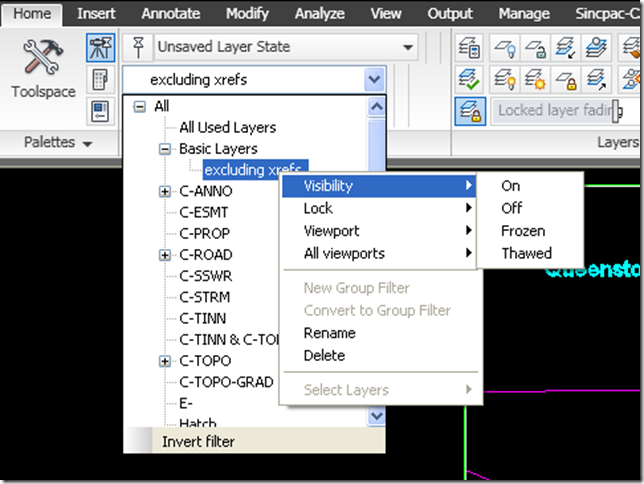
to have the filter export button appear in the layer manager this means you can build up your filters over time and import your standard filters into new and old drawings. Also if you have progressed to using the ribbon you can add the layer filter combo control thru your cui to the ribbon so you can access your filters direct from the ribbon and turn layers on/off and freeze/thaw them in logical groupings. Much quicker them picking one at a time in the layer dropdown control.
image

Thursday, 25 November 2010

AUv Keeping track of time

All the times for AUv are in PST download this Microsoft tool to add different timezones to your taskbar
http://www.microsoft.com/downloads/en/details.aspx?familyid=07fb0bd8-f390-458d-a629-6f0258ac7cdf&displaylang=en

Wednesday, 24 November 2010

VBA in STARTUP function in acad.lsp

Remember that the aireys menu item is added by vba thru the launch of a lsp function with Startup function in the acad.lsp file.
As vba is not in 2011 I have commented out this function not to run. The following menu will not be displayed any more until the code is updated to vb.net
image

Sorting Objects off layer 0

Putting objects on layer zero and depoints is bad news when you start using those drawings as xrefs as those layers are common across all drawings.
To sort things of the these layers isolate them and then open the properties window ctrl+1 and select the object to move to the correct layer in the drawing
then select the layer dropdown in the properties window click it to open the dropdown and then start typing the full layer name. Note that the dropdown box will recognise the text as you type and not just the first letter like the layer manager and will go to the exact layername you type. Good for dealing with all those long AIA layer names.

Civil 3d restore layer filters

To restore the layer filter import and export buttons see the following website
http://www.civil3d.com/2008/10/restoring-classic-layer-filters/
Once you have setup the setting on one pc’s registry right click the setting and go export to create a .reg file.  Save at a common location (F:\CIVIL3d\LAyerfilter) now go to another PC double click on the file on the other PC’s to import the setting into that PC’s registry. Network deployment maybe add to a batch file?
image

Tuesday, 28 September 2010

Method for Posting data to blogger with cut and paste short cut keys


Over the last four years I have written up and documented a lot of stuff on Civil3d in word documents for my own records. In the last few weeks and months I have been looking into the best way I can publish some of this stuff to the web on this blog. Ideally I wanted a free way to just cut and paste sections of my word documents directly onto the web in blogger. Two issues cropped up straight away
1. That in the blogger editor you have to stop and upload images of screen captures you wanted to paste into your blog you can not just paste them in with ctrl+v
2. That for some reason text copied from word put blank lines in between some lines.
To get around the first issue with a free solution I have downloaded and installed Windows Live Writer and installed the free addon Clipboard Live with this setup I can just ctrl+c copy in word and ctrl+v paste into Windows Live Writer and publish directly to blogger. Also I can easily adjust the size of the images with writers built in tools.
To overcome the second issue I had to understand that it was the pressing of the enter key at the end of an incomplete line to jump to a new line rather than shift+enter that inserts line break and not a paragraph break. So I have had to revise my writing process in word to type to the end of the line and have the text wrap by its self automatically or press shift+enter to jump to a new line. To update old documents you can use find and replace as discussed at this link swap paragraph breaks to line breaks http://word.mvps.org/FAQs/Formatting/CleanWebText.htm
Related Posts Plugin for WordPress, Blogger...