I had an interesting question the other day from a colleague. Did I think you could find the average height of a profiles PVI with an expression? My immediate thought was no.
With a little bit of playing around my initial thought was confirmed.
This is because the general pitfall with labels, be it direct object labels or those nested in bands that use expressions, are that the content available for use in the label or expression are object specific and you only have access to that specific objects properties. (There are the odd exceptions to this but not many that jump to mind).
You should note, however, that the objects properties you do see in expressions are only a limited selection of those object properties that can be accessed with C# or VB .net.
Now, when I first saw expressions demonstrated in an early demo of Civil3d 2007, I thought these labels and expressions are great ! No more text updating. But then I thought, what if you could call VB.net sub routines from these labels/expressions to recalculate on the fly as well and update the label ? That would be awesome. Alas, this is yet to eventuate.
Three wishes I have had for expressions for a while are:-
This problem can be easily solved using VB.net, to do it I stitched together a number of bits of code freely available on the web, as I am a bit rusty on coding at the moment having not done any since NZAU a couple of months ago. Here is the process I went though:-
First I had a look at the shipped samples to see if there was an example that worked with profiles to see how to access a profile information. I found one here: C:\Program Files\Autodesk\AutoCAD Civil 3D 2011\Sample\Civil 3D API\DotNet\VB.NET\ProfileSample\readme.txt
To get the example code up and running, to walk through the code refer to the process outlined in my earlier post here Now all of the shipped examples work by generating objects from programmed settings and not by selecting existing objects. That’s fine for shipped examples but in the real world we want to select an object in the drawing and work with it. To see how to do this, there is a good example available here posted by Joshua Modglin . It deals with selecting alignment objects so I downloaded the source code and modified it as highlighted below to select profiles only.
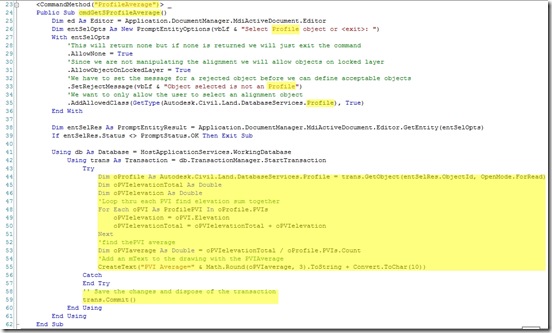
Next, I added a sub routine code to output the calculated PVI average to the drawing as a text. In line 55 of the code above reference is made to the routine “CreateText”. To create this routine I just took the code from the online developer help here and removed the imports highlighted below as we already have them in our class and do not need to double up.

Then I added the following lines of code to pass text to the sub routine and ask the user for the insertion point for the text.

Once complete I tested the code by “netload” ing the test.dll and calling the new command “Profileaverage” . It worked as follows and you can download the source code here compiled for 2011 32bit.
With a little bit of playing around my initial thought was confirmed.
This is because the general pitfall with labels, be it direct object labels or those nested in bands that use expressions, are that the content available for use in the label or expression are object specific and you only have access to that specific objects properties. (There are the odd exceptions to this but not many that jump to mind).
You should note, however, that the objects properties you do see in expressions are only a limited selection of those object properties that can be accessed with C# or VB .net.
Now, when I first saw expressions demonstrated in an early demo of Civil3d 2007, I thought these labels and expressions are great ! No more text updating. But then I thought, what if you could call VB.net sub routines from these labels/expressions to recalculate on the fly as well and update the label ? That would be awesome. Alas, this is yet to eventuate.
Three wishes I have had for expressions for a while are:-
- As above vb.net routines could be called from expressions.
- That pipe expressions in bands could access all the properties of structures attached to them upstream and downstream.
- If statements should be able to return text answers like, if statements in Excel.
This problem can be easily solved using VB.net, to do it I stitched together a number of bits of code freely available on the web, as I am a bit rusty on coding at the moment having not done any since NZAU a couple of months ago. Here is the process I went though:-
First I had a look at the shipped samples to see if there was an example that worked with profiles to see how to access a profile information. I found one here: C:\Program Files\Autodesk\AutoCAD Civil 3D 2011\Sample\Civil 3D API\DotNet\VB.NET\ProfileSample\readme.txt
To get the example code up and running, to walk through the code refer to the process outlined in my earlier post here Now all of the shipped examples work by generating objects from programmed settings and not by selecting existing objects. That’s fine for shipped examples but in the real world we want to select an object in the drawing and work with it. To see how to do this, there is a good example available here posted by Joshua Modglin . It deals with selecting alignment objects so I downloaded the source code and modified it as highlighted below to select profiles only.

Next, I added a sub routine code to output the calculated PVI average to the drawing as a text. In line 55 of the code above reference is made to the routine “CreateText”. To create this routine I just took the code from the online developer help here and removed the imports highlighted below as we already have them in our class and do not need to double up.

Then I added the following lines of code to pass text to the sub routine and ask the user for the insertion point for the text.

Once complete I tested the code by “netload” ing the test.dll and calling the new command “Profileaverage” . It worked as follows and you can download the source code here compiled for 2011 32bit.


